

Why I Built Lopala: A Real-Time WebOS in Rust
We were using sshx for remote collaboration, but, it only shares the terminal. No file uploads, no visual text editing, no real environment sync. I initially planned to contribute to sshx, but adding all that would fundamentally change what sshx is meant to be.
So, I built Lopala.
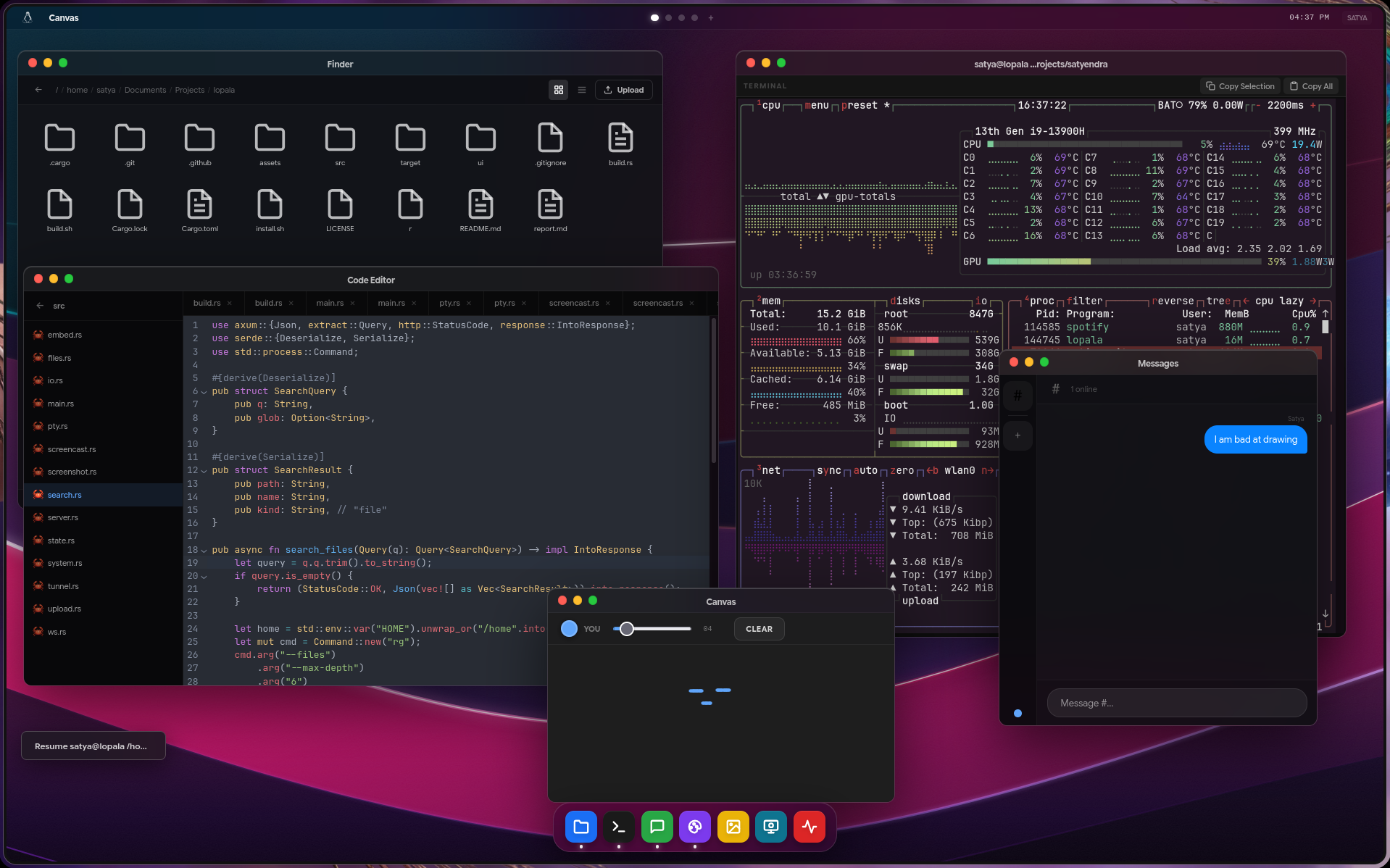
It uses the same forking process to simulate a terminal, but it doesn’t end there. It is a full, shared Operating System in the browser.
You run the binary, open the generated link, and share the PIN with your team or a senior dev. Everyone instantly sees the exact same state of apps, window positions, file selections, and live keystrokes.
You can install it right now:
curl -fsSL https://raw.githubusercontent.com/s4tyendra/lopala/main/install.sh | bash
And run:
lopala --tunnel --port 8452 --pin 0000
Here is the low-level breakdown of how the engine actually works.
1. The Multi-User Real-Time PTY
Lopala isn’t just a basic web shell. It uses the nix crate’s forkpty() to create the master/slave file descriptors and fork a new process to run $SHELL. We use ioctl TIOCSWINSZ to pass terminal resizing directly from the browser’s xterm.js to the UNIX process, making resizing feel completely native.
lopala pipes the raw master file descriptor into a custom async stream using tokio::io::poll_read_ready. (std::fs::File is blocking)
The UTF-8 Panic: When a new client joins, they need to see the past terminal output (like if htop is running). so, keeping a rolling history buffer in memory and slice anything over 50KB.
But, raw byte slicing will cut a multibyte UTF-8 character or ANSI escape code in half. ‘runtime panic.’
The Fix: Implementing manual character boundary traversal before truncating:
while start < s.len() && !s.is_char_boundary(start) {
    start += 1;
}
I also added a custom wdl bash script that gets injected into an ephemeral /tmp/lopala/bin $PATH. If you type wdl filename in the terminal, it prints the ANSI code \033]999;DOWNLOAD;%path\007, which the frontend intercepts to trigger a direct browser download.
2. Synced State File Manager & Chunked I/O
The file manager is completely synced globally via WsEvent::FileSync. If I scroll down, enter a folder, or select a file, everyone else sees it instantly.
More importantly, it handles massive file transfers safely. If you upload a 10GB .iso, you can’t push that through a WebSocket. I implemented an S3-style multipart uploader:
POST /files/upload/init: Sends the filename and total size. Rust pre-allocates the exact file size on disk usingset_len()and returns asession_id.- The browser splits the file into 10MB chunks.
POST /files/upload/{session_id}?part=0: Rust verifies the SHA256 hash and uses direct offset writing (offset = part * 10MB) to dump the chunk directly into the pre-allocated file. Zero/tmpcaching. Zero wasted disk I/O.
3. CRDT-Lite Collaborative Text Editor
The built-in text editor supports syntax highlighting and folder workspaces. Because multiple people can type simultaneously, it uses Operational Transform logic (like Google Docs).
When a user types, WsEvent::EditorOp broadcasts the insert or delete string alongside the character offset position. Every operation has an incrementing version number tied to its file_path. If the backend detects a desync (an operation arriving out of sequence), the client automatically pulls the strict state from the source. Combined with real-time remote cursor projection (WsEvent::EditorCursor), visual conflicts are practically eliminated even with high latency.
4. Zero-Friction Tunneling
If --tunnel flag used, the Rust backend searches the system for cloudflared. If it’s missing, it detects the host CPU architecture (x86_64 or aarch64), pulls the binary straight from Cloudflare’s GitHub releases, chmod +xs it, and spawns the tunnel child process automatically. No firewall configuration required.
5. System Search & Screen Streaming
Hitting Ctrl+K triggers a REST API call executing rg --files --maxdepth 6 -g '{q}' ~ via ripgrep for blazing-fast system-wide file searching.
If the host system has a display attached, Lopala can stream the live screen to the web UI. It uses grim to capture the screen every 100ms and streams the output exclusively to the clients requesting it.
Releasing
Pushing a tag triggers a GitHub Action that:
- Compiles the Vue frontend.
- Embeds the static output directly into the Rust binary using
rust-embed. - Cross-compiles for
x86_64andaarch64usingcrossand targetsmuslfor pure, drop-in static binaries with zeroglibcdependency issues.
Metrics (AWS t3.micro)
I stress-tested this with 10 simultaneous users on an AWS t3.micro (1 vCPU, 1GB RAM) in the ap-south-2 (Hyderabad) region. We ran terminal commands, the file manager, live canvas, and messaging for an hour.
- Latency: ~20ms (Avg ~120ms, Max 400ms)
- CPU Usage: 0.7% average, 1.2% peak.
- RAM Usage: 30MB average, 40MB peak.
- Bandwidth: ~31MB total over 56 minutes.
(File uploads/File downloads usage not included metrics), we used terminal, file manager, canvas, messaging and some searches.
(Note: It should theoretically run fine on macOS ARM, but it is untested. Windows support is currently unknown. PRs are welcome).
Check out the code, star the repo, and let me know if you manage to break it: github.com/s4tyendra/lopala