Submitting a Pull Request
Once your changes are done locally, submit them for review.
1. Commit and Push
Commit Standards
We use Conventional Commits. Keep messages clear and descriptive.
feat:for new features (e.g.,feat: added hackathons page)fix:for bug fixes (e.g.,fix: corrected navbar alignment)docs:for documentation changeschore:for maintenance (e.g.,chore: updated dependencies)
git add .
git commit -m "feat: added new hackathons page with responsive grid"
Verify Remote and Push
Make sure you are pushing to your fork (origin), not the upstream repository.
Check your remotes:
git remote -v
# Output should look like:
# origin  https://github.com/<your-username>/iiitkota.ac.in.git (fetch)
# origin  https://github.com/<your-username>/iiitkota.ac.in.git (push)
Push your branch:
git push origin main
# Or if you are working on a specific branch:
# git push origin <your-branch-name>
2. Create Pull Request (PR)
- Go to your fork on GitHub:
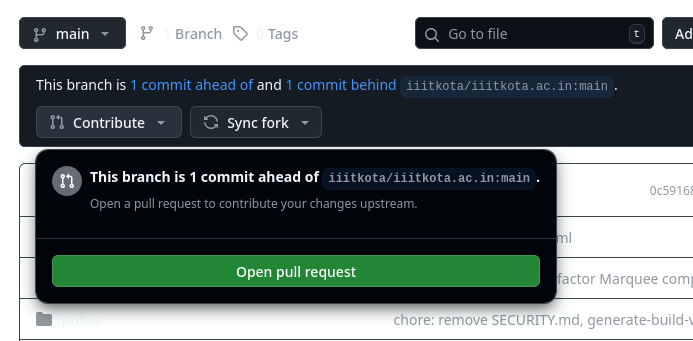
https://github.com/<your-username>/iiitkota.ac.in. - You should see a banner saying “This branch is ahead of iiitkota:main”.
- Click the “Compare & pull request” button.
Fill PR Details
- Title: concise summary of changes (e.g., “Feat: Added Hackathons Section”).
- Description: explain what you changed and why.
- Reviewers: on the right sidebar, click Reviewers and select a senior maintainer (e.g.,
@s4tyendra).
Click “Create Pull Request”.
3. Automated Preview and Review
After the PR is created, GitHub Actions will trigger a build.
Deploy Bot
- Wait for the bot to comment on your PR.
- It will provide a preview URL (e.g.,
https://hash-beta.iiitkota.ac.in). - Use it to test changes in a live environment without merging code.
Preview Access
The preview environment is password-protected.
- Username:
iiitkota - Password: shared separately in the internal group. Ask if you do not know it.
Final Review
- If changes are requested, update locally, commit, and push again. The PR updates automatically.
- Once approved, a maintainer will merge your code into the main repository.